


Student Dashboard
04/04/2024
How can I get to the dashboard specifically for students viewing.
As the Teacher, how can I see the student's dashboard.
Am I able to control what students see?


Pregunta a la comunidad y obtén ayuda de tus compañeros para aprender, compartir y crear increíbles materiales de aprendizaje.
How can I get to the dashboard specifically for students viewing.
As the Teacher, how can I see the student's dashboard.
Am I able to control what students see?
Hello everyone
Someone knows how to change the PDF file of an activity? before it was possible easily. I want to make a modification on my PDF document, without having to create a new activity from 0.
Hola a todos
Alguien sabe como cambiar el archivo PDF de una actividad? antes era posible fácilmente. Quiero hacer una modification del documento sin tener que crear una nueva actividad desde 0.
MÔN TOÁN
I entered students, how do I invite them to join?
I can't find my students login information.
HOw do you remove a worksheet from "saved worksheets?
Hello.
I set the local time zone to "Seoul" in my account and saved it. Since last year's update, the worksheet that students submit doesn't match the time zone in Seoul. What else should I do?
Please give me a quick answer.
Have a nice day.
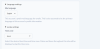
I've had a few students fill out worksheets, submit them, grade them, and then when they log back in, all their work is gone. Can you please do something about this?
Hello.
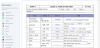
I have had a saving problem after editing a worksheet, so I asked you about it last week, and you said it was because I didn't enter the correct answer values. I'm sending you some captured images of editing and saving problem.
In the attachment, "Saving Problem-01" is the screen where I made some edits and I clicked the "SAVE" or "SAVE AND VIEW" button and nothing happened. After I click "SAVE" or "SAVE AND VIEW", I'm back to the file as it was before I edited it, and all the answers I entered are gone. I've done the same thing several times, and I've tried working on different computers. I'm having this problem over and over again, and it's preventing me from creating new worksheets or even editing existing ones.
I would appreciate a quick response.
Best regards.
Whether you’re looking for quick answers from our articles or direct help from our support team, we’ve got you covered.

