error cannot upload my new worksheet
01/19/2026
Oops, something went wrong. Check your browser's developer console for more details.
Image



Ask the community and get help from your peers to learn, share and create amazing learning materials
Oops, something went wrong. Check your browser's developer console for more details.
Oops, something went wrong. Check your browser's developer console for more details. This is showing when I try to reate new worksheet. Please guide

I'd like to know how to solve this problem with mp3 files, as I upload them normally, but they don't work when I try to play them.
Buen día, lo que sucede es que mis estudiantes no pueden realizar sus actividades, las seleccionan para iniciar y no les aparece nada, es decir, no aparece la actividad.

I try to upload a word document and make it into a live worksheet but that cannot be done. I don't understand why. How can I get help?
I am currently testing out liveworksheet, and i wanted the worksheet to be private, it says that it is private but when people search it up it can be seen and opened
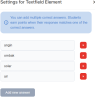
Hai, so I add the element of text field into my worksheet. It said we can add mutiple answers to it. However right after I add the answers, more than one, there is not save option. Why this happened? I attached a ss of this problem here.
i pay $ 7 every month, to avoid advertisment . I share the worksheet in google class for my students. They still recevied advertisment every single worksheet. How to do ?
saya tidak bisa mengupload file, knp yaa, padahal ukurannya dibawah 5 mb
Good afternoon,
My students are having the error below when they click Finish button. It stay loading and never ends, Even though it shows the results, it's not saved. So basically my students are unable to save their homework.
Error message: Opps, something went wrong. Check your browser's developer console for more details.
Please check the images I'm attatching.

Whether you’re looking for quick answers from our articles or direct help from our support team, we’ve got you covered.

