


AUDIOS WON'T PLAY
05/25/2025
Hi everyone, I need help cause in many worksheets, the recordings won't play once they are included into a workbook. But it does when I get into the worksheet. Need help with this detail please.


Ask the community and get help from your peers to learn, share and create amazing learning materials
Hi everyone, I need help cause in many worksheets, the recordings won't play once they are included into a workbook. But it does when I get into the worksheet. Need help with this detail please.
Its visible on pc but not on phone
The DRAG and DROP options are not working. When you set the DROP function, DRAG appears; and the DRAG function does nothing, it remains static.
Hi, how can I find the answers in the worksheets? They self-correct themselves, showing the mistakes but I can´t see WHY they are wrong.
Buenos días,
Soy nueva en la comunidad, doy clases particulares y quería saber como puedo acceder a las respuestas de las fichas, no tengo alumnado registrado al no ser un centro educativo.
¡Muchas gracias!
Dear admins,
I am using liveworksheets in my classroom and it is a wonderful tool for my kids. But, after updation of this website, I am unable to see my answers, can you help me to solve my problem?
Like
Edit
Reply

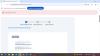
Me dice Topic/skill is required pero el título está escrito.
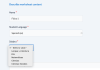
Hola, al crear una ficha, en el campo de Asignatura (Subject), solo me aparecen 5 opciones. ¿Alguien sabe por qué no aparecen el resto de asignaturas o cómo puedo añadirlas?
¡Gracias de antemano!
Buongiorno le scrivo per alcune domande:
1. è possibile non assegnare il punteggio alle domande aperte? Il programma non è in grado di valutarne la correttezza.
2. C'è la possibilità di estendere il numero dei Worksheets privati?
grazie
Hello,
I use LiveWorksheets in my Spanish classes as "Do Nows" and I share my worksheets with my students through our Google Classroom Daily Stream Announcement.
When I add the link to my announcement, the thumbnail picture shows a few tiny words and next to it, it says, "Just a moment" (all in black and white). Before, it was a mini screenshot of the worksheet being shared so my students knew that THAT was the link to click. Now, with the new thumbnail, some of my students are not sure where the link is because it blends in with the screen in their chromebooks.
Would you be able to change it so that the thumbnail of the link reflects the worksheet again?
Or, at least put your logo as a thumbnail so it is clear where they should be clicking for their "Do Nows"?
Thank you!
Whether you’re looking for quick answers from our articles or direct help from our support team, we’ve got you covered.


