HOLY DAYS

Vocabulary - Language Arts

1

Student Guide: How to Use Your Interactive Worksheet


Welcome! This worksheet is designed to help you practice all four English language skills (Reading, Listening, Writing, and Speaking). Follow these 6 steps in sequence:


Phase 1: Input and Comprehension


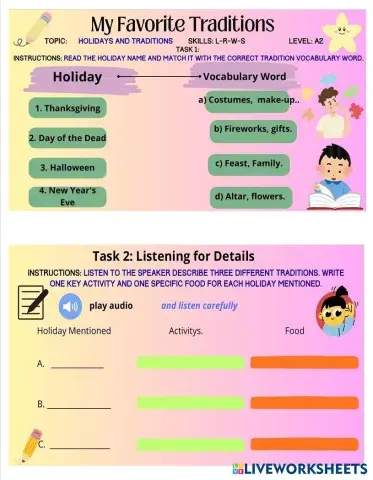
  1. Vocabulary Power-Up (TASK 1): Start by reading the holiday names and drag the tradition vocabulary word that best describes each one into the correct column.
  2. Time to Listen! (TASK 2): Click "play audio" to listen to the description of the three traditions. While listening, write one key activity and one specific food in the designated spaces (A, B, C).
  3. Reading Check (TASK 3): Read the text about Christmas Eve in El Salvador. Then, drag the TRUE or FALSE labels next to the three statements to verify the information.


Phase 2: Production (W & S)


  1. Write Your Invitation (TASK 4A): In the "Write your invitation here" space, write your 5-7 sentence paragraph inviting Ben. Make sure to include the date, the description, and a question about his traditions.
  2. Record Your Voice (TASK 4B): Use the "REC" function (or your own recording app) to record yourself reading the invitation you just wrote. Focus on clear pronunciation and a friendly, natural tone.


Phase 3: Wrap-up and Analysis


  1. Reinforcement and Conclusion: Read the congratulatory message. Afterward, open the link provided at the bottom of the page to watch a video and check what similarities you find between the different celebrations you've learned about.

HOLY DAYS

Vocabulary - ESL

 1

Student Guide: How to Use Your Interactive Worksheet


Welcome! This worksheet is designed to help you practice all four English language skills (Reading, Listening, Writing, and Speaking). Follow these 6 steps in sequence:


Phase 1: Input and Comprehension (R & L)


  1. Vocabulary Power-Up (TASK 1): Start by reading the holiday names and drag the tradition vocabulary word that best describes each one into the correct column.
  2. Time to Listen! (TASK 2): Click "play audio" to listen to the description of the three traditions. While listening, write one key activity and one specific food in the designated spaces (A, B, C).
  3. Reading Check (TASK 3): Read the text about Christmas Eve in El Salvador. Then, drag the TRUE or FALSE labels next to the three statements to verify the information.


Phase 2: Production (W & S)


  1. Write Your Invitation (TASK 4A): In the "Write your invitation here" space, write your 5-7 sentence paragraph inviting Ben. Make sure to include the date, the description, and a question about his traditions.
  2. Record Your Voice (TASK 4B): Use the "REC" function (or your own recording app) to record yourself reading the invitation you just wrote. Focus on clear pronunciation and a friendly, natural tone.


Phase 3: Wrap-up and Analysis


  1. Reinforcement and Conclusion: Read the congratulatory message. Afterward, open the link provided at the bottom of the page to watch a video and check what similarities you find between the different celebrations you've learned about

เทคโนโลยี 1 - ม2

Physical Science - Science

ระบบคอมพิวเตอร์ (computer system) ประกอบด้วย 2 ส่วนหลัก คือ


1. ฮาร์ดแวร์ คือ ส่วนประกอบของเครื่องคอมพิวเตอร์และอุปกรณ์ ซึ่งประกอบด้วย 3 หน่วย ดังนี้

  1. 1) หน่วยประมวลผลกลาง (Central Processing Unit : CPU) ทำหน้าที่ประมวลผลข้อมูลหรือ คำสั่งที่อยู่ในหน่วยความจำที่ผู้ใช้งานสั่งให้โปรแกรมหรือเครื่องคอมพิวเตอร์ทำงานอย่างใดอย่างหนึ่ง
  2. 2) หน่วยความจำและจัดเก็บ (memory and storage unit) ทำหน้าที่เก็บข้อมูลคำสั่งหรือโปรแกรม
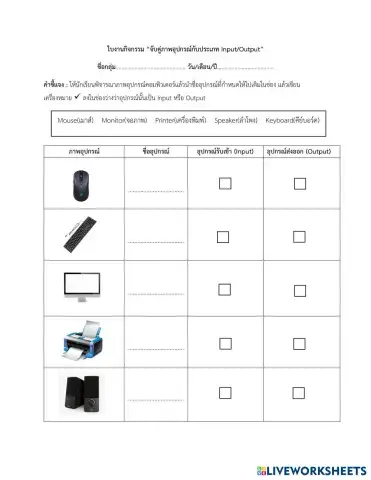
  3. 3) หน่วยรับเข้าและส่งออก (input/output unit) ทำหน้าที่รับเข้าข้อมูลหรือรับคำสั่งจากภาย นอกเข้าสู่การประมวลผลและส่งออกผลลัพท์จากการประมวลผล

2. ซอฟต์แวร์ คือ โปรแกรมหรือชุดของโปรแกรมทำหน้าทีควบคุมการทำงานของฮาร์ดแวร์ เพื่อให้สามารถ ดำเนินการต่างๆ ตามที่กำหนด โดยแบ่งออกเป็น 2 ประเภท ดังนี้

  1. 1) ซอฟแวร์ระบบ (system software) แบ่งเป็น 2 ส่วน คือ
  • - ระบบปฏิบัติการ (operating system) เช่น วินโดวส์ (Windows) ลินุกซ์ (Linux) ไอโอเอส (iOS ) แอนดรอยด์ (Android)
  • - โปรแกรมอรรถประโยชน์ (utility program) เช่น โปรแกรมตรวจและป้องกันไวรัส โปรแกรมจัดเรียงพื้นที่ดิสก์
  1. 2) ซอฟแวร์ประยุกต์ (application software) เช่น โปรแกรมจัดเก็บข้อมูลนักเรียน

สร้างและปรับแต่งใบงานสำหรับทุกห้องเรียน

LiveWorksheets ทำให้คุณครู ผู้ปกครอง และผู้สอนแบบโฮมสคูล สามารถออกแบบและมอบสื่อการเรียนรู้ที่น่าสนใจได้อย่างง่ายดาย เพียงอัปโหลดไฟล์ PDF หรือเริ่มต้นสร้างใหม่ทั้งหมด คุณก็สามารถทำได้ทุกอย่าง ไม่ว่าจะเป็นใบงานคณิตศาสตร์แบบโต้ตอบ ใบงานอ่านจับใจความ ใบงานการคูณ หรือใบงานสำหรับเด็กอนุบาล ด้วยขั้นตอนเพียงไม่กี่คลิก เครื่องมือแก้ไขแบบลากและวางของเรารองรับทุกระดับชั้นและทุกวิชา ช่วยให้คุณปรับเนื้อหาให้ตรงกับแผนการสอน การบ้าน หรือแบบทดสอบ ครูสอนภาษาอังกฤษ (ESL) ยังสามารถสร้างใบงาน ESL แบบเฉพาะ เพิ่มตารางเสียงภาษาอังกฤษ หรือออกแบบกิจกรรม ESL เพื่อให้การเรียนสนุกและมีส่วนร่วมมากขึ้น สร้างกิจกรรมที่ปรับระดับได้ ตรวจอัตโนมัติ ช่วยประหยัดเวลา และสนับสนุนการเรียนรู้ของนักเรียนให้ดียิ่งขึ้น

คลังสื่อการเรียนรู้ครบวงจรสำหรับ K-12 และ ESL

เข้าถึงใบงานที่พร้อมใช้หลายพันชุด ครอบคลุมทุกวิชาในระดับ K-12 รวมถึงใบงานอนุบาล ใบงานคณิตศาสตร์ แบบฝึกการคูณ แบบฝึกอ่านจับใจความ และทรัพยากร ESL เลือกค้นหาตามชั้นเรียน วิชา หรือระดับทักษะ เพื่อให้ได้สิ่งที่คุณต้องการ ไม่ว่าจะสำหรับห้องเรียนประถม ทบทวนในระดับมัธยมต้น หรือการฝึกในระดับมัธยมปลาย ครู ESL ยังสามารถสำรวจคลังใบงาน ESL และกิจกรรมภาษาอังกฤษที่ออกแบบมาเพื่อรองรับผู้เรียนทุกระดับ เนื้อหาใหม่ถูกเพิ่มเข้ามาอย่างต่อเนื่อง LiveWorksheets จึงเป็นทรัพยากรที่ยืดหยุ่นและช่วยสร้างผลลัพธ์การเรียนรู้ที่ยั่งยืน