

คำแนะนำของผู้เขียน
Student Instructions: How to Complete the Practice Worksheet
Read Each Question Carefully
Do not rush through the questions. Read every sentence carefully, especially scenario-based and riddle questions, to identify key words (like input, output, portable, or storage).
Section-Wise Directions:
Section A (Multiple Choice Questions): Select or circle only one correct option for each question.
Section B (Fill in the Blanks): Use the clue box provided at the top of the section. Each word/phrase from the clue box is used exactly once.
Section C (True or False): Read the entire statement before deciding. Circle or write True if the statement is correct, or False if it contains incorrect information.
Section D (Scenario & Riddles): Think about real-life situations. Write precise, single-word or short-phrase answers (e.g., Web Camera, Microphone).
Section E (Classification Challenge): Fill in the bracket with the single letter corresponding to the device type:
I for Input devices
O for Output devices
S for Storage devices
General Tips for Competition Success:
Double-Check Your Answers: Before submitting, review your paper to make sure you haven't left any question unanswered.
Focus on Key Terms: Remember the fundamental definitions:
Input: Sending data into the computer.
Output: Getting processed results from the computer.
Storage: Saving data for future use.
Spelling Matters: Make sure to spell device names correctly when writing them down in short-answer questions.


คำแนะนำของผู้เขียน
Student Instructions: How to Complete the Practice Worksheet
Read Each Question Carefully
Do not rush through the questions. Read every sentence carefully, especially scenario-based and riddle questions, to identify key words (like input, output, portable, or storage).
Section-Wise Directions:
Section A (Multiple Choice Questions): Select or circle only one correct option for each question.
Section B (Fill in the Blanks): Use the clue box provided at the top of the section. Each word/phrase from the clue box is used exactly once.
Section C (True or False): Read the entire statement before deciding. Circle or write True if the statement is correct, or False if it contains incorrect information.
Section D (Scenario & Riddles): Think about real-life situations. Write precise, single-word or short-phrase answers (e.g., Web Camera, Microphone).
Section E (Classification Challenge): Fill in the bracket with the single letter corresponding to the device type:
I for Input devices
O for Output devices
S for Storage devices
General Tips for Competition Success:
Double-Check Your Answers: Before submitting, review your paper to make sure you haven't left any question unanswered.
Focus on Key Terms: Remember the fundamental definitions:
Input: Sending data into the computer.
Output: Getting processed results from the computer.
Storage: Saving data for future use.
Spelling Matters: Make sure to spell device names correctly when writing them down in short-answer questions.
สำรวจแผ่นงาน
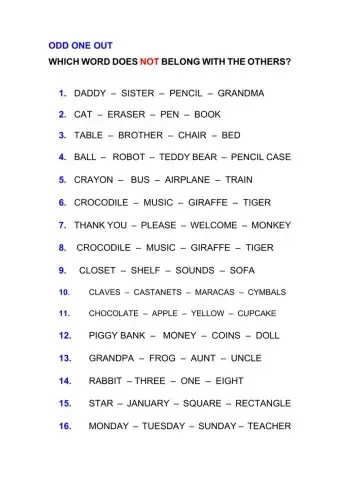
Odd one out
- Language Arts
- 2nd grade

Numbers
- Language Arts
- 2nd grade

The Circus
- Language Arts
- 2nd grade

Song unit 4 lwu 2
- Language Arts
- 2nd grade