


คำแนะนำของผู้เขียน
In this lesson, students begin with a warm-up discussion about their current devices and the main differences they perceive between Mac and Windows. They then expand their technical lexicon by matching 15 common computer terms (e.g., ecosystem, user-friendly, customization, crash, value for money, interface) to corresponding visual icons.
The core media task features an audio segment where four individuals (Madeline, Weston, Ella, and Johnathon) share their personal preferences for either Mac or Windows. Students listen actively to identify each person's choice and the specific reasons they provide, paying close attention to the newly introduced vocabulary in context.
Next, the lesson transitions to a comprehensive grammar focus on comparative structures. Students review the basics of short and long adjectives before advancing to more nuanced, real-world forms. This includes adding emphasis (much/far more), comparing adverbs and nouns (more/less/fewer), expressing equality (as... as), using verbs with quantity (as much/many as), and constructing double comparatives (The more..., the less...).
Finally, the class concludes with a personalized speaking task, where students evaluate various pairs of options (e.g., streaming services, lifestyle choices) and justify their preferences using a variety of the comparative structures practiced in the lesson.
My Google Classroom Courses

Quick Access
All Classes

Mac VS Windows


คำแนะนำของผู้เขียน
In this lesson, students begin with a warm-up discussion about their current devices and the main differences they perceive between Mac and Windows. They then expand their technical lexicon by matching 15 common computer terms (e.g., ecosystem, user-friendly, customization, crash, value for money, interface) to corresponding visual icons.
The core media task features an audio segment where four individuals (Madeline, Weston, Ella, and Johnathon) share their personal preferences for either Mac or Windows. Students listen actively to identify each person's choice and the specific reasons they provide, paying close attention to the newly introduced vocabulary in context.
Next, the lesson transitions to a comprehensive grammar focus on comparative structures. Students review the basics of short and long adjectives before advancing to more nuanced, real-world forms. This includes adding emphasis (much/far more), comparing adverbs and nouns (more/less/fewer), expressing equality (as... as), using verbs with quantity (as much/many as), and constructing double comparatives (The more..., the less...).
Finally, the class concludes with a personalized speaking task, where students evaluate various pairs of options (e.g., streaming services, lifestyle choices) and justify their preferences using a variety of the comparative structures practiced in the lesson.
สำรวจแผ่นงาน
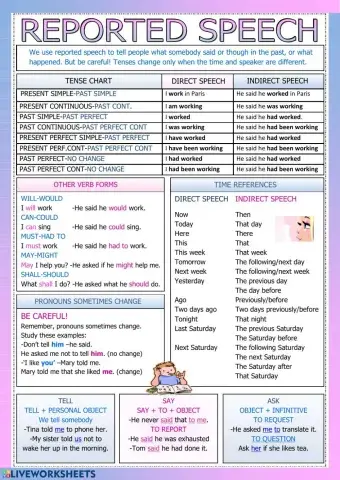
Reported speech
- ESL
- B1


