



คำแนะนำของผู้เขียน
guía aparte:
HOW TO COMPLETE THIS WORKSHEET ONLINE
- Click on the link your teacher shared with you.
- Type your name and your teacher's email where it asks (if requested) — this is how your answers get sent.
- Read each exercise carefully before answering.
- Click on each blank space and type your answer directly on the screen.
- For open questions (like Part 6 - Writing), write full sentences, not just single words.
- When you finish, click the "Finish" button at the bottom of the page.
- Choose "Email my answers to my teacher" (or "Check answers" if your teacher asks you to see your score first).
- Make sure you see a confirmation message before closing the page, this means your work was sent!
⚠️ Important: If you don't see a confirmation message, your answers were NOT sent. Try again or take a screenshot and send it to your teacher.
My Google Classroom Courses

Quick Access
All Classes

Present Perfect: Affirmative, Negative, and Questions


Active — user can report
 Report this worksheet
คำแนะนำของผู้เขียน
guía aparte:
HOW TO COMPLETE THIS WORKSHEET ONLINE
- Click on the link your teacher shared with you.
- Type your name and your teacher's email where it asks (if requested) — this is how your answers get sent.
- Read each exercise carefully before answering.
- Click on each blank space and type your answer directly on the screen.
- For open questions (like Part 6 - Writing), write full sentences, not just single words.
- When you finish, click the "Finish" button at the bottom of the page.
- Choose "Email my answers to my teacher" (or "Check answers" if your teacher asks you to see your score first).
- Make sure you see a confirmation message before closing the page, this means your work was sent!
⚠️ Important: If you don't see a confirmation message, your answers were NOT sent. Try again or take a screenshot and send it to your teacher.
สำรวจแผ่นงาน

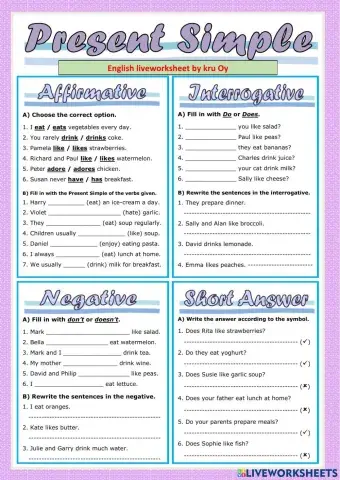
Present Simple Tense
- ESL
- B1

