
Sending works

Hi. I want to kno how to get the box with the send my work to the teacher button after finish it. Me and my students cant have it. I think we are missing something.

kohai
Latvia
10/1/2022
After clicking "Finish", you have to scroll up to see that option.
ADRIANA MATUS
Mexico
10/1/2022
Image
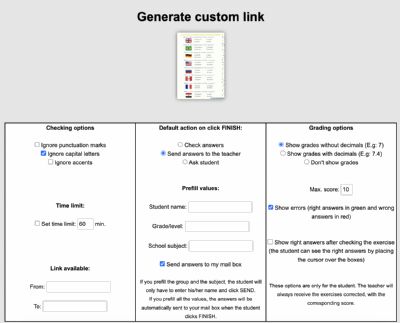
You have to set it up to do so before you send them the link. Choose the worksheet you want to send them. Right above the worksheet there's an option that says Custom link. Click there. A form appears with three columns. In the one that says Default action, make sure you have Send answers to the teacher clicked. I also add the grade/level and the subject to help keep a bit of control of what activities they've done (later, when you check their answers in your mailbox, it's easier to find one worksheet by clicking on the Subject if you have multiple worksheets sent that day/week/month). Copy and send them the link, or if you're using a platform like Classroom, Teams or Whatsapp for your classes, use those options to send the link.
When students click finish, a box that says Send appears. All the do is write their names (I suggest complete name) and then click Send.