
So many problems with the new site

There are so many problems with the new site! Using the older version, all the worksheets were accessible on pc, tablets or phones. Now I do not feel confident giving homework on Liveworksheets, as my students face a lot of challenges when they try to do them. First of all, trying to do tasks on phones is almost impossible, as they get distorted from the start or become a mess after submitting answers. Listening tasks give a headache too. While using the old version, you just needed to select the right browser, now you can here part of the exercise and part you don't. The Download PDF option is still not solved either. I do not let to download my wss, but they are still downloadable. Also, why it isn't possible to see how many times wss were used in workbooks or marked as favourite???
I hope you will manage to fix this site and at least reach the quality it had before.
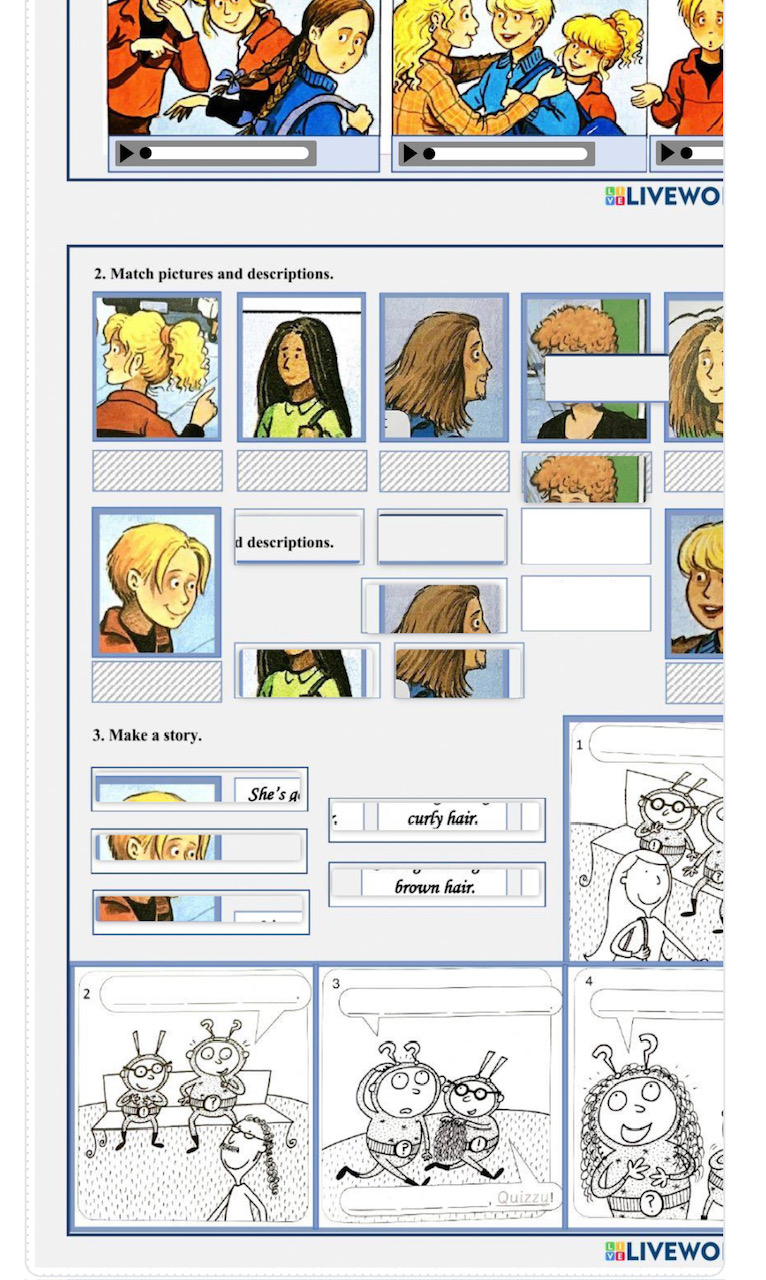
Hi Silvania, I looked into your account and this worksheet in particular and was able to successfully listen to each section, and the drag and drop features also seemed to work. I did this as a custom link, and I wasn't able to download the worksheet, nor was it currently assigned to a workbook so I don't know how it could be viewed or downloaded as a student otherwise. Please see the screenshot that a student sees after submitting the work. You'll also see my test score that was submitted to you under the notifications. I think what may be happening is that you're viewing this worksheet as a teacher, which of course allows you to do all the things like downloading worksheets, but you can control what your students see. I hope this helps! https://www.liveworksheets.com/help/using-liveworksheet/teacher-account…
In reply to Hi Silvania, I looked into… by Jason Robert
Hello, Jason. I do not check Download function while being logged in to the site. Only when I am logged out. It is enough to have a link to a ws and it downloads perfectly well.
In reply to Hi Silvania, I looked into… by Jason Robert
@Jason, I dare say that Silvania's inquiries are not exactly as you've explained.
1) That particular worksheet works fine on a computer, but not on smaller devices. As for me, I can listen to the recordings, but I can't do the drag-and-drop task as it appears distorted on my phone. Please take a look at the screenshot.
2) About the 'Download PDF' option, this feature was initially meant for authors to decide whether they wanted to allow the downloading of their work or not. It served as a means of protecting copyrights, acting as a small barrier for those who might upload others' work on platforms like Scribd. Strangely enough, now, you don't even need to be a registered user of LW; you can simply browse worksheets and download whichever ones you want. By the way, we have previously discussed this issue here: https://www.liveworksheets.com/community/q/topic/7144763/download
Ruta
In reply to @Jason, I dare say that… by kohai
Thank you for the feedback. I have relayed this to our team to investigate further. 1) What's odd is that I'm unable to replicate the worksheet issue in my own tests, but I do see the issue on Silvania's worksheet. Could be something tied to hers. If you have any other examples, that would be helpful - please add them here. 2) This will be looked at by our team and I hope to have a solution soon.
It sometimes happens.(I had something like this several times) Just refresh the page and the problem disappears. It may be due to the Internet connection.
TeacherAdrianCAMBRIDGE
TEXTFIELD ELEMENT SOLUTION - Follow @MR_STRONGMAN 👍on Tiktok for ✨🏆GREAT MATERIAL🥇✨ Advanced idiomatic expressions in English with real video clips, Advanced Vocabulary such as phrasal verbs, Advanced verbs, Advanced adjectives, and more. ✅
✍ SOLUTION:
Are you trying to see the ANSWERS as we used to?
Is there a message " Textfield Element " and you cannot see the answers?
Do this:
1. Got to the part that says; " My Workbooks "
2. Click on " Add workbook " (Note: It's optional if you have already one or more created)
3. Go to the exercise which you want to see the answers.
4. Instead of " How was it made " CLICK ON: "Add to my workbooks"
5. Choose a workbook (The one you created or whichever you choose but remember which one)
6. Open the workbook where you added it
7. Find the exercise (worksheet) you want to see the answers
8. Hoover the mouse over the TOP RIGHT CORNER - "A menu will appear"
9. Click " EDIT " on that menu
10. BINGO 🙌😁 You will see the answers there. 👍✨ Follow me @MR_STRONGMAN on Tiktok
Note: I believe this was done so that our students can't see the answers because some are so clever and they created teacher accounts just to see the answers and cheat in our assignments. 👀😬
Well, I hope this has been useful for you.
My best regards,
Mr Strongman
Update here that the download pdf issue has been resolved. @Silvana, I tested this with your worksheet and was able to confirm that users are no longer able to download worksheets when this option is set to none.
In reply to Update here that the… by Jason Robert
Great! Thanks a lot. : )
mstrj08
the speaking test option is not working in any ios devices. most of my kids are using iphone and it is not working at all. even they adjusted the settings (allow microphone) on the phone or browser still not working at all.
dore
Hi. We have been facing a problem these days. The FINISH button is not displayed in our workbooks. Could you inform us about this?
sarahgrimstone
Where have all my worksheets gone?
The old website was much more user-friendly. Now, creating accounts and adding new students requires too many steps — it feels much more complicated.
Cristache_1
Doresc să expun o problema: când vreau să salvez o fisa de lucru, practic rămâne doar imaginea și nu se salvează nimic din ce am lucrat! Am două conturi Cristache 1 și CRISTACHE, pe ambele întâmpin aceleași probleme! Va mulțumesc!