
textbox error not allowed to be empty

The Textbox issue has not been resolved yet. I cannot leave the Textbox blank so students can write their own answers. When notified about that, the website immediately crashed and could not be saved and viewed. This Vietnamese lesson is difficult for me because students need open-ended answers. That in the old version is perfect. Why don't you let the old version continue to work? Take my $40 per month and switch to the version that wastes time and has many errors, causing an extremely bad experience.
Image
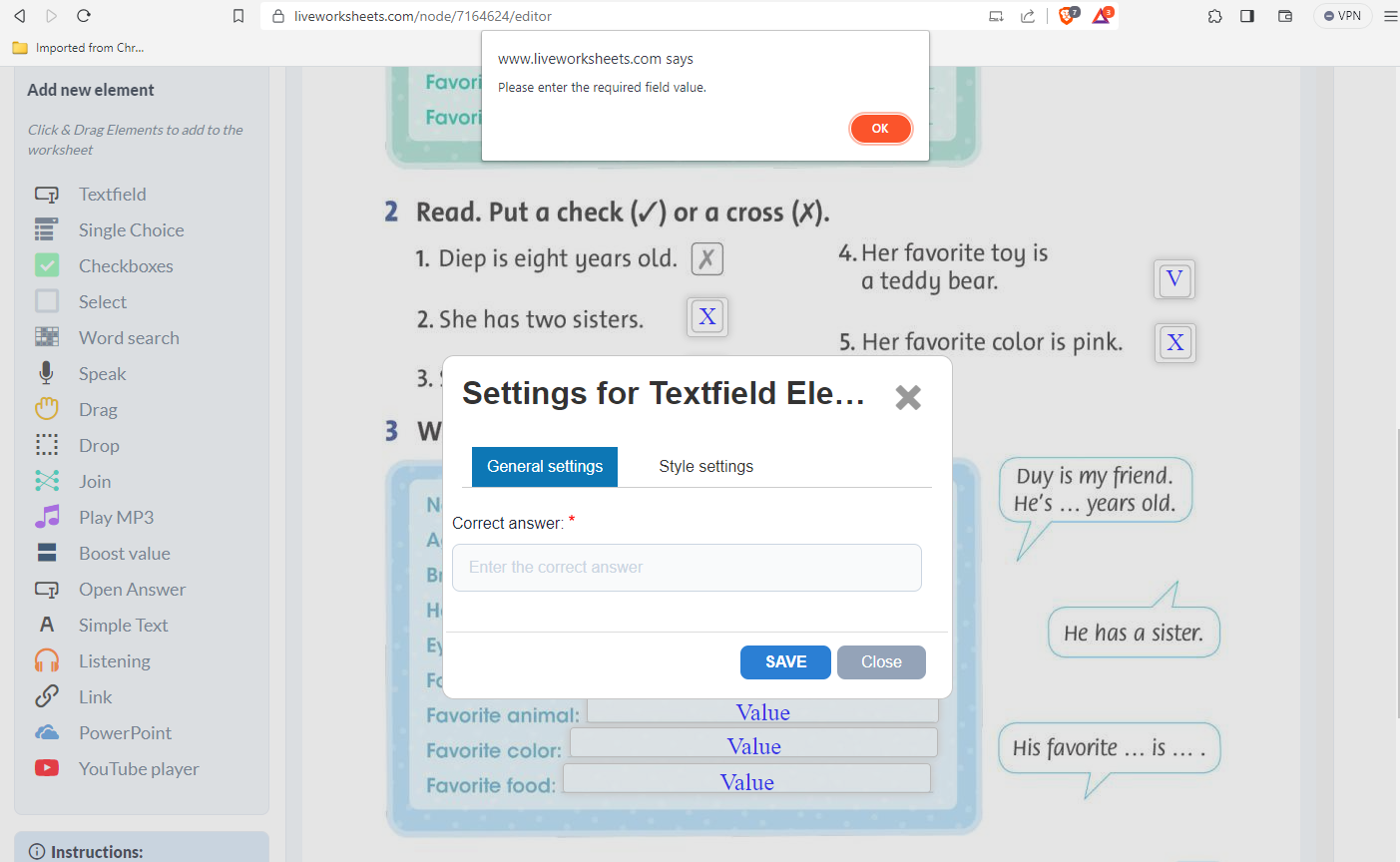
Hi Lucas, it looks like you're using the Textfield element which requires a value so when students use it, there's a right/wrong answer. The field I believe you're looking for is the element labeled Open Answer little lower down the menu in your screenshot. Please try that field and let us know how that works.
In reply to Hi Lucas, it looks like you… by Jason Robert
Hello
And why haven't allowed textfields to be left empty? In the previous version of LiveWorkSheets it was allowed and great for certain types of exercises (musical measure separation, for example, where a lowercase letter L is placed in the corresponding box to separate measures and certain boxes must be kept empty)
I have been able to read the suggestion of the open answer option. The problem with the open answer option is that, although it resolves the issue of the empty field, the teacher must review it before granting the score, while in the case of textfields this review would be done automatically.
In several exercises, when converting from the previous version to the current one, the formats have been changed (this type of exercises only works with certain fonts so that it remains elegant in its format) and, when changing the format of the answer boxes (with lowercase l letter) no problem, but when changing the format in the empty boxes (otherwise, the students would notice the difference in style and would understand that the boxes in which the style doesn't match with the elegance are not correct), the exercise cannot be saved.
I already suspected it was because of this after having done a few tests, but I don't understand why it hasn't been left as it was, because it was great.
Would it be possible to allow empty textfields again?
Thanks in advance for any clarification.
All the best.
Cảm ơn cho sự giúp đở cảu bạn Jason Robert tôi đã tìm ra được chức năng có thể có câu trả lời mở.
Thanks for your help Jason Robert I have found the function that might have an open answer.
Hello
And why haven't allowed textfields to be left empty? In the previous version of LiveWorkSheets it was allowed and great for certain types of exercises (musical measure separation, for example, where a lowercase letter L is placed in the corresponding box to separate measures and certain boxes must be kept empty)
I have been able to read the suggestion of the open answer option. The problem with the open answer option is that, although it resolves the issue of the empty field, the teacher must review it before granting the score, while in the case of textfields this review would be done automatically.
In several exercises, when converting from the previous version to the current one, the formats have been changed (this type of exercises only works with certain fonts so that it remains elegant in its format) and, when changing the format of the answer boxes (with lowercase l letter) no problem, but when changing the format in the empty boxes (otherwise, the students would notice the difference in style and would understand that the boxes in which the style doesn't match with the elegance are not correct), the exercise cannot be saved.
I already suspected it was because of this after having done a few tests, but I don't understand why it hasn't been left as it was, because it was great.
Would it be possible to allow empty textfields again?
Thanks in advance for any clarification.
All the best.