

Cómo incrustar o embeber ficha en MOODLE

Cuando se copia el código HTML para embeber en Blog o página web y se pega en Moodle, la ficha no se incrusta, sino que aparece un enlace a la propia ficha, otra a otras fichas del autor/a y otra a Liveworksheet, y no es eso lo que queremos.
Para lograr embeberla basta con poner este código HTML en una página de Moodle:
iframe width="1200" height="900" frameborder="0" src="aquí la URL de la ficha a embeber"/iframe
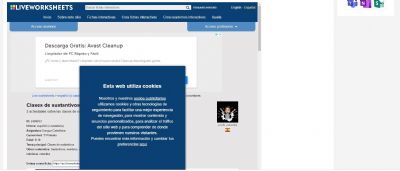
Si la ventana en la que aparecerá la ficha es muy grande o pequeña podéis cambiar los valores en el propio código. Yo la he puesto de 1200 x 900 y de ese modo la ficha se ve entera a lo ancho. En la imagen podéis ver cómo queda.
Espero que os sirva.
Image

kohai
Latvia
10/28/2022
It's useful. Thank you for sharing.
kohai
Latvia
11/5/2022
Image
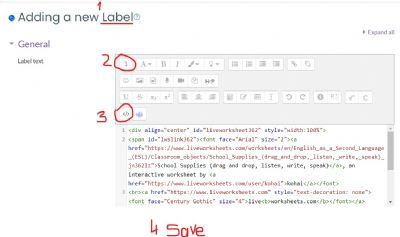
Just want to add that I still find it easier to embed a liveworksheet into Moodle using the HTML code. Steps:
1) Turn editing on
2) Add activity or resource
3) Label
4) In Label text click on More (Step No 2 in the pic.)
5) Choose Embed (Step No 3 in the pic.)
6) Paste the HTML code
7) Save.

Lina
Spain
11/7/2022
deberias borrar el link que te sale por defecto y pegas el link de la ficha que has copiado nada mas y te sale

