Hello,
Thanks for reaching out.
I understand your point, and yes, our team has updated this feature to make it more user-friendly.
Please go to My Dasboard, then click my workbooks.
Open the workbook you want to edit.
Click select (See screenshot attached).
Igor (LW Team)
Venezuela
09/18/2026
Image
Then go to the bottom of each workbook page, you'll see a "Drag to reorder" hand, you can use it to move the page. (See screenshot).
Igor (LW Team)
Venezuela
09/18/2026
Once it is done, make sure to save the changes.
I hope this points you in the right direction, let us know if you have any questions.
Pedro Vera
Spain
09/22/2026
Perfect, thank you!
Igor (LW Team)
Venezuela
09/23/2026
We are glad to help :)
Anna Aparicio
Spain
09/28/2026
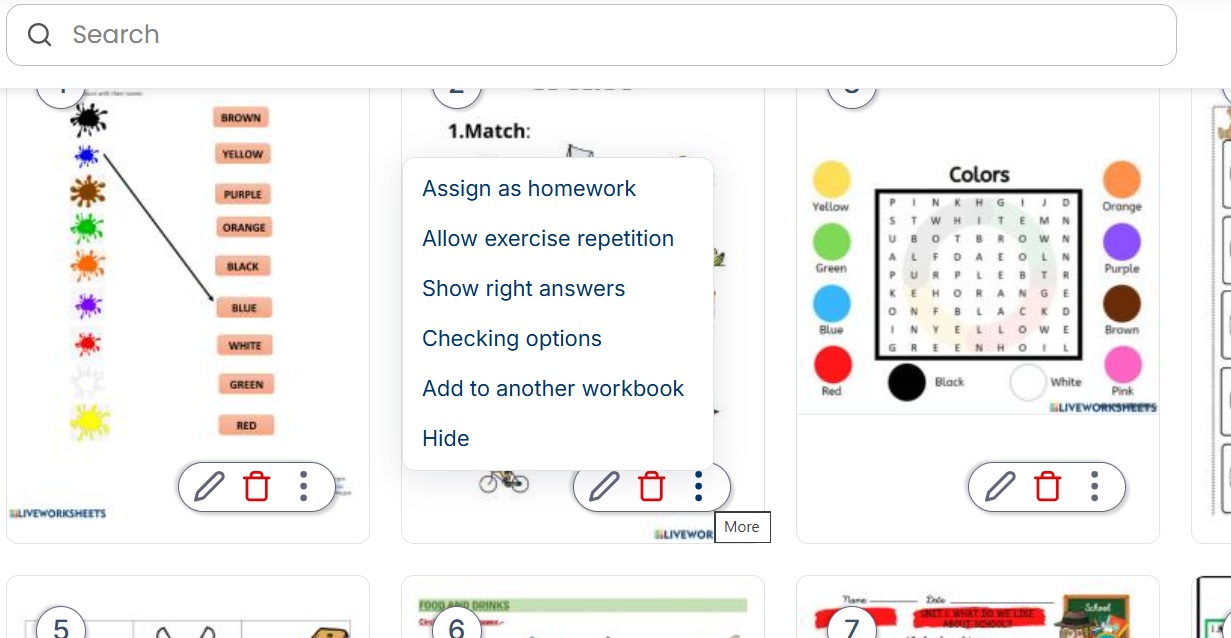
Unfortunately that doesn't work in my worksheets. Underneath it doesn't apper the "drag to reorder", but only an option to delete or hide.
Anna Aparicio
Spain
09/28/2026
OK, I have discovered that I can move the sheets if I drag and drop them by using the six points below! Problem solved.
Igor (LW Team)
Venezuela
10/7/2026
No problem at all, Anna, if you have any questions feel free to email us at [email protected].


Hello,
Thanks for reaching out.
I understand your point, and yes, our team has updated this feature to make it more user-friendly.
Please go to My Dasboard, then click my workbooks.
Open the workbook you want to edit.
Click select (See screenshot attached).
Then go to the bottom of each workbook page, you'll see a "Drag to reorder" hand, you can use it to move the page. (See screenshot).
Once it is done, make sure to save the changes.
I hope this points you in the right direction, let us know if you have any questions.
Perfect, thank you!
We are glad to help :)
Unfortunately that doesn't work in my worksheets. Underneath it doesn't apper the "drag to reorder", but only an option to delete or hide.
OK, I have discovered that I can move the sheets if I drag and drop them by using the six points below! Problem solved.
No problem at all, Anna, if you have any questions feel free to email us at [email protected].